
Leads & CRM
Forms, waivers, and e-sign
Prepare waivers and intake, collect signatures on your site, and keep signed PDFs on the CRM record—required at booking, sent after, or sent from the record any time.
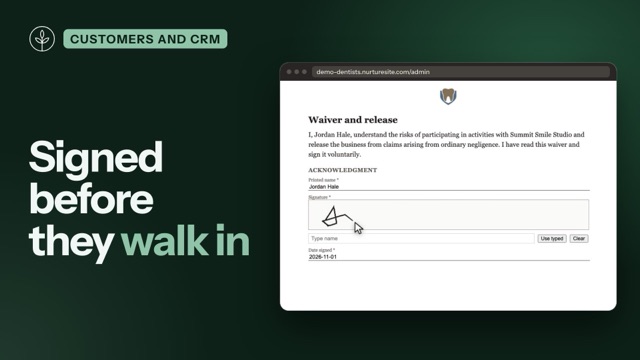
Site admin → CRM → Documents is the library for waivers, intake forms, letterhead, and uploaded PDFs. You prepare a letter or PDF by dragging Standard fields onto the page—the same idea as DocuSign Prepare, without a nested field form.
Every signed document belongs to a CRM record. The signed PDF, the Certificate of Completion, and any mapped answers land on that customer, patient, or household. A booking is optional. You choose when a document goes out:
- Required on a service — the time stays held until they sign, then the deposit if one is due.
- After a booking confirms — attach it to the service as after confirm.
- With no booking at all — Request signature on the record, or a Request signature step in an automation. See Send without a booking.
Packages, answers, and signed PDFs live only on the site. They are not copied into NurtureSite’s sales CRM and never appear on factory lead webhooks.
NurtureSite is not a DocuSign clone. We copy the eSignature core local service businesses actually use (templates, fields, embedded/remote sign, audit + certificate). We skip DocuSign IAM, CLM, identity verification, notary, bulk send, and in-document payments.
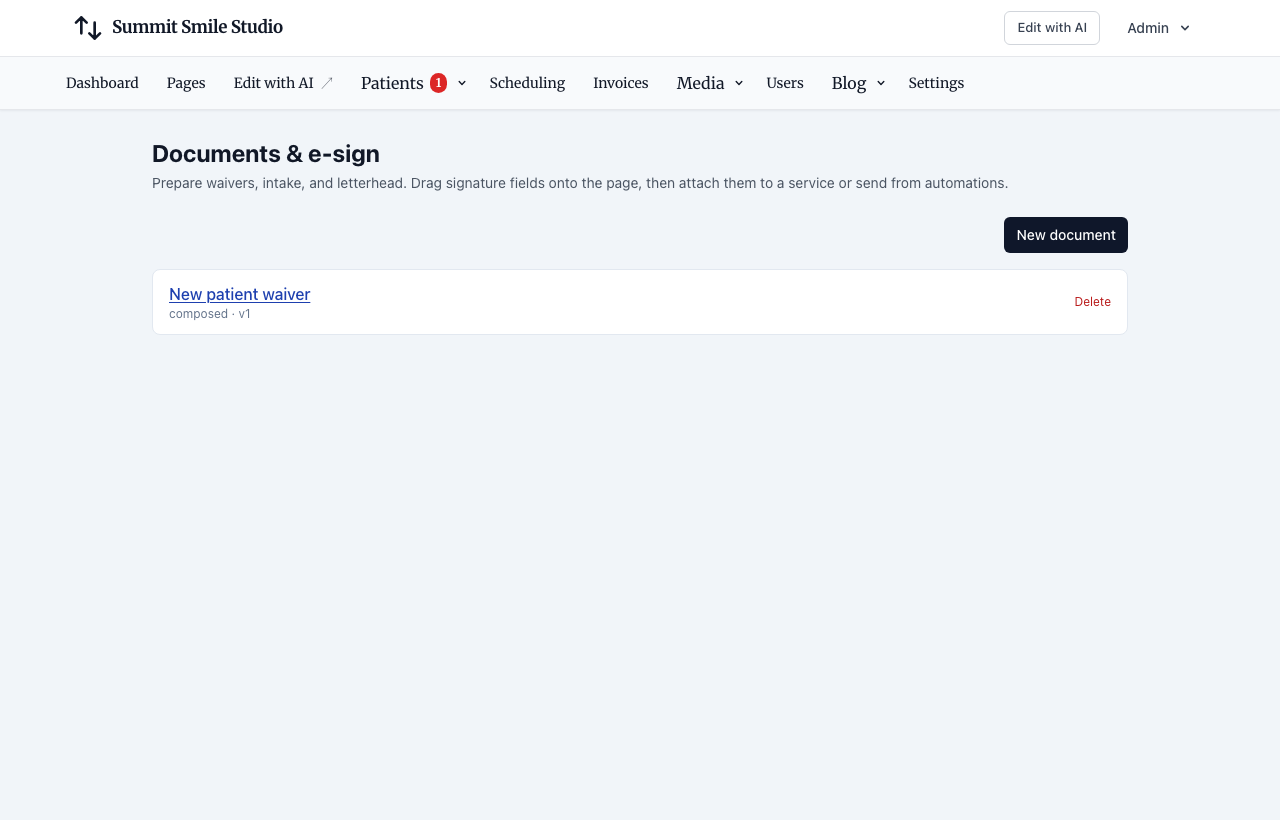
Compose or upload
The editor is a Prepare workspace (DocuSign-familiar): pick a recipient, drag Standard fields onto the page, click a tag for properties. Composed letters are edited in place; PDF uploads are tagged on the page.
- Compose — US Letter or A4. Content rail: heading, section, body, logo, image, divider. Insert customer data puts
{{name}},{{site_name}}, … at the caret. Fields appear as colored tags (not a form grid). Gold = Primary (booker); other recipients get their own color plus a label. - Starters — blank, letterhead, waiver, intake.
- Upload PDF — drag Signature / Initials / Date signed onto each page. Use the page guide for multi-page PDFs. Word and Pages files are not converted on this server; export to PDF first.
- Form only — stacked fields without a letter page (same field catalog).
- Preview as signer — interactive pads and inputs; nothing is saved. Preview / print uses the same layout as the signed PDF.
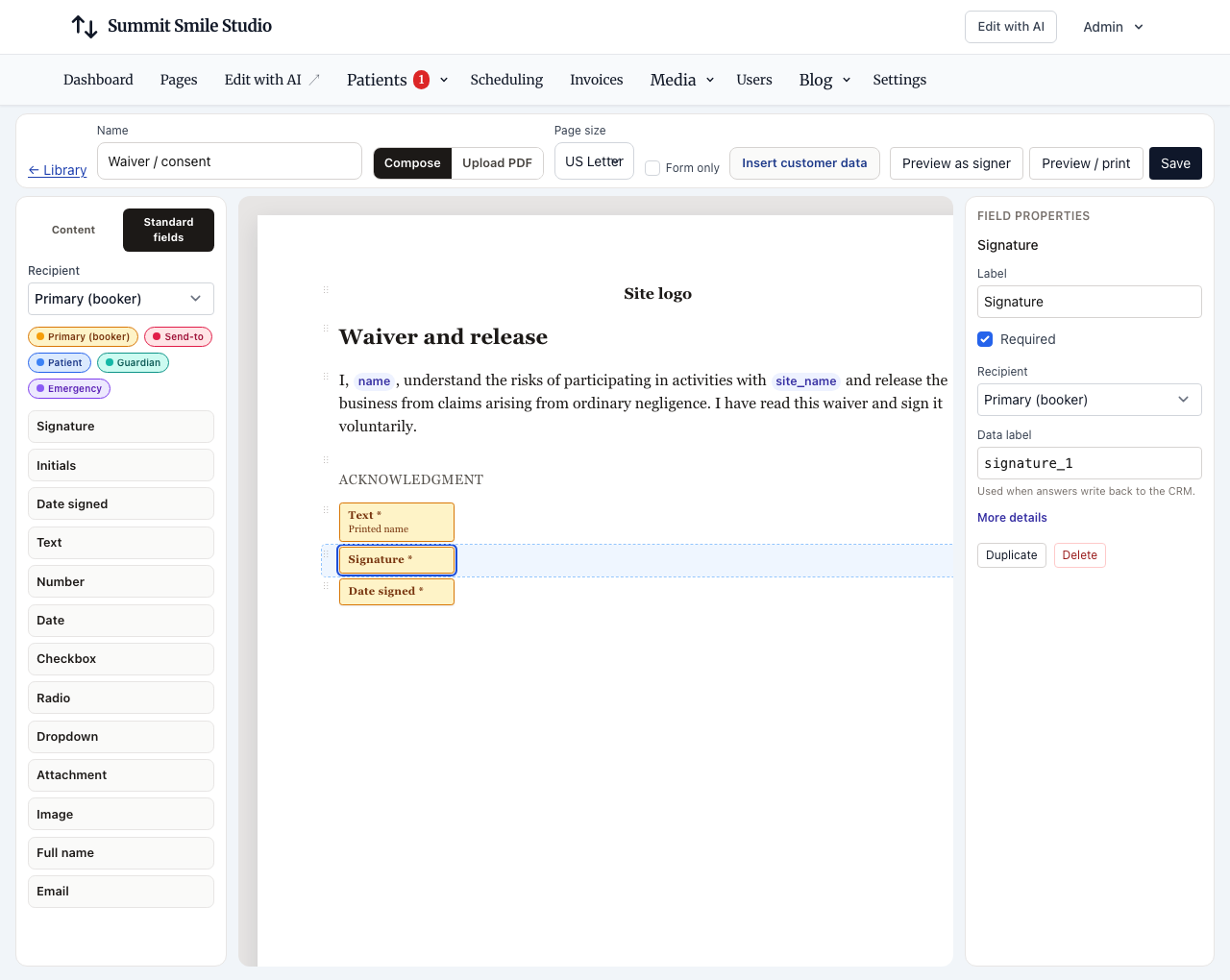
Click a tag for Field properties: required, recipient, data label, read only. More details (collapsed): prefill from customer data, save answer to CRM, validation, options, show-if. Bindings store keys (not “Patient” labels), so renaming the CRM noun does not break packages. Save warns if the document has no Signature or Initials field.
Attach to a service (optional)
Skip this if the document isn’t tied to an appointment. On Scheduling → Services, attach packages as:
| When | What visitors see |
|---|---|
| Required before confirm | Slot stays held until signed. The widget returns a sign URL instead of Stripe Checkout. After every required envelope is complete, Checkout starts if the service has a deposit; otherwise the booking confirms. |
| After confirm | Sent once a CRM record exists (after the appointment confirms). Uses a record signing link, not the booking manage token. |
The booker is the signer at booking time. Phone-only bookers can sign in the widget without an email. Remote email send is skipped unless the package collected an email — we do not mail empty addresses.
While they sign, the time is held for at least 60 minutes from when they picked it (longer if the site’s slot hold is longer). Cancel or an expired hold voids open envelopes.
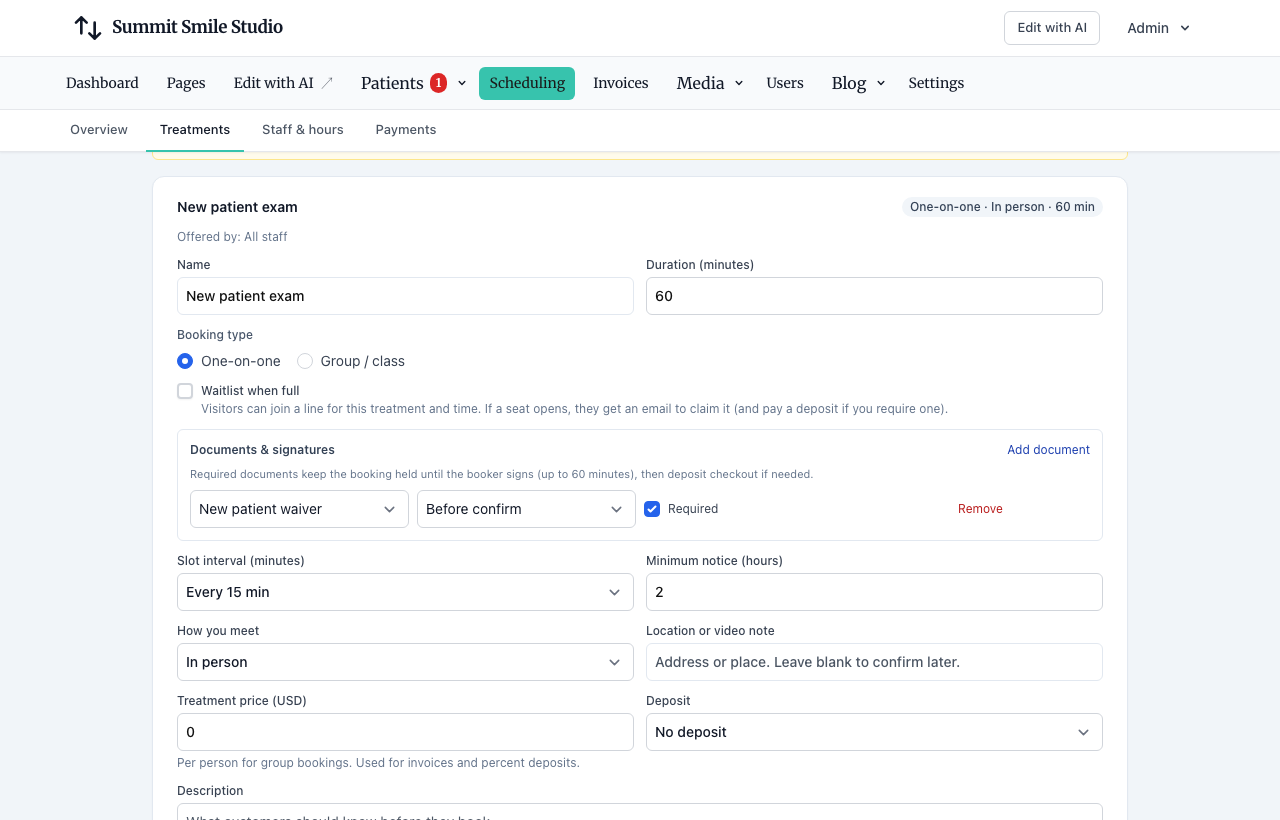
Staff calendar bookings that skip straight to confirmed skip before confirm packages; after confirm packages still go out. To collect a skipped form later, use Request signature on the record (below).
Group classes and waitlists
- Group: one envelope per booking (the person who reserved). Party size is not N signatures.
- Waitlist join has no package. Packages start when promotion creates a held appointment.
See Group and class bookings and Booking waitlists.
After the record exists
Confirmed bookings create or match a CRM record, then attach the flattened PDF and Certificate of Completion. Mapped answers write back to custom fields / additional_data / contact fields after that record exists — never into the factory create payload.
Merging duplicate records re-points Lead envelopes (and signer contacts) onto the survivor so signed PDFs do not vanish.
Send without a booking
To get a signature from someone who hasn’t booked—an enrollment packet after a tour, a service agreement after a quote, a photo release for a current client:
- From the record — open the record, then Documents → Request signature. Pick the document, the person who signs (the customer, a parent, the homeowner—anyone on the record with an email or phone), and email or text. Text needs SMS set up.
- From an automation — add a Request signature step and start it from a trigger, for example New lead captured, Form submitted, or Lead status changed.
The link goes to that one person, and the signed PDF lands on the record. The record’s Documents card lists every signature request with its status (Waiting, Opened, Signed, Declined, Cancelled, Expired), links to the signed PDF and certificate, and lets you email or text the link again (the old link stops working) or cancel the request. Requests that hold a booking stay with the booking—cancel the booking instead. In HIPAA mode, sending needs the same communication consent as email. There is no public signing link: every link is for one person.
Automations
| Node / trigger | Behavior |
|---|---|
| Fill document | Internal: merge tags into the package and attach the PDF. Does not email. Allowed in HIPAA mode. |
| Request signature | Emails or texts a signing link to one person: the primary contact, the person marked send-to, or a role you pick such as parent or homeowner. It does not message everyone on the record. In HIPAA mode it needs the same communication consent as email. |
| Wait until document signed | Continues when that envelope completes (envelope_completed). |
| Document signed / declined | Triggers (document_completed / document_declined). |
| Attach document | Still copies a media-library file (unchanged). |
Who signs is separate from who gets a marketing email. On a preschool record, “all contacts” includes the student, so a signature request is sent to the parent. On a household, it goes to the homeowner or spouse, not every person listed on the job.
Conditions can read envelope.status and form.* field values stored on the enrollment.
Demo/preview sites do not run live automations. The library and embedded booking sign still work.
Do not email filled health-history PDFs in HIPAA mode. Request signature is consent-gated; fill document stays internal.
Evidence (ESIGN / UETA)
Before signing, the recipient accepts a click-through electronic signature disclosure. They can type a name or draw a mark. The site stores an audit trail (IP, time, events), a SHA-256 of the flattened PDF, and a Certificate of Completion. Signed files are private (staff or the original signing link), not public media URLs.
This is an evidence pattern for typical service waivers and intake — not a notary, identity-verification, or legal-advice product. Help copy stays honest: typical US waivers, intake, and photo consent — not closings, loans, or wills.
Delete a package
You cannot delete a package while envelopes are in flight. Detach it from services first. Completed envelopes keep the pinned version bytes.
Industry examples
| Industry | Typical seed |
|---|---|
| Dental | Required waiver on New patient exam |
| Fitness | Optional class waiver |
| Preschool | Enrollment forms sent after the tour confirms |
| Restaurant | Library and automations (no booking types required) |
| Home services | Homeowner / spouse signer on the household |
DocuSign: what we copy vs skip
DocuSign’s current product is three platforms (eSignature, IAM/Maestro, CLM). We copy eSignature for local businesses, not IAM, CLM, or identity verification.
Copy (in this product)
| DocuSign-class capability | How it shows up here |
|---|---|
| Templates | Document packages (compose or upload) with a Prepare workspace and versioned field catalog |
| Tabs / fields | Signature, initials, date signed, text, number, date, checkbox, radio, select, file, image; required vs optional; validation; locked merge-tag prefill; simple show-if |
| Embedded signing (PowerForms analog) | Hosted /sign/{token} page on the site; the booking widget hands off to it |
| Remote send | Email or SMS to one person: picked on the record, or a mapped contact role in automations (never all contacts) |
| Envelope lifecycle | Complete, decline, void on cancel or expired hold, staff cancel, expire, staff resend and up to two automatic reminders (each with a fresh link) |
| Pin versions | In-flight envelopes keep the field map they started with |
| Audit + Certificate of Completion | Envelope events + CoC PDF |
| ESIGN disclosure / intent | Click-through disclosure + typed or drawn mark + IP/user-agent/timestamps + SHA-256 |
| Prefill from CRM | Merge tags and appointment booker fields |
| Write-back | Explicit mappings to custom/additional fields after a CRM record exists |
Native flatten ships first (composed HTML → PDF, uploaded PDF overlays). A vendor driver later can reuse the same field map if a customer wants a third-party certificate (pass-through cost).
Schema now, UI later
These can be stored on the field/signer map today; staff UI is later:
- Two-role serial routing (guardian then patient)
- In-person kiosk on a front-desk device
- View-only acknowledgments (HIPAA notice / house rules)
Skip (not this product)
| DocuSign / IAM / CLM area | Why we skip it |
|---|---|
| Identity verification (IDV), KBA, SMS OTP ID, biometrics | Extra vendor + HIPAA/PII surface |
| Notary / SES / qualified eIDAS / EU QES | Different legal product |
| Bulk send / PowerForms lists | Wrong fit vs per-booking and per-record envelopes |
| In-document card payments | Stripe deposits and invoices already exist |
| Fax / WhatsApp / Teams delivery | Email, SMS, and embedded cover v1 |
| Formula fields and AI field placement | Out of scope for v1 waivers/intake |
| CLM, contract lifecycle, Salesforce/CLM connectors | Not a legal-ops suite |
| Admin IAM, Maestro, SSO to DocuSign, org-wide template sharing across brands | Each site has its own library |
| Word/Pages conversion | Client containers have no LibreOffice — export to PDF first |
Do not market this as “court-ready like DocuSign.”
Related articles
- Online booking setupServices, staff, hours, timezone, payments, and the booking block.
- Booking waitlistsPer-service waitlists, offer-to-claim holds, class email, and booking amendments.
- Group and class bookingsCapacity, class times, party size, and remaining spots on the widget.
- CRM automationsVisual follow-up flows: triggers, email, conditions, webhooks, and testing.
- Leads vs bookingsWhen to use contact forms vs the booking scheduler.
- Visitor experienceForms, consent, optional AI chat agent, booking flow, unsubscribe, and website logins.
- Site CRMNamed records (Customers, Patients, Households, Students, Leads), pipeline, tasks, alerts, invoices, and follow-up automations in site admin.
- CRM recordsName the list Customers, Patients, Households, Students, or Leads; primary contact, matching, consent, and send audience.
- Stripe Connect, deposits, and invoicesCollect appointment deposits, send customer invoices, and receive payouts.
- Limitations and roadmapFeatures not yet available and known gaps. See /changelog for the public product roadmap.