
Leads & CRM
CRM automations
Visual follow-up flows: triggers, email, conditions, webhooks, and testing.
Build follow-up automations visually in site admin → CRM → Automations. Each flow is a graph of nodes connected on a canvas — similar to workflow tools like n8n, scoped to one CRM record (a customer, patient, household, student, or lead). Enrollment is per record, not per contact.
Automations require CRM and sequences enabled. Auto-enrollment respects marketing consent on each person and channel. Demo sites do not run live automations — screenshot the builder only.
Automations list
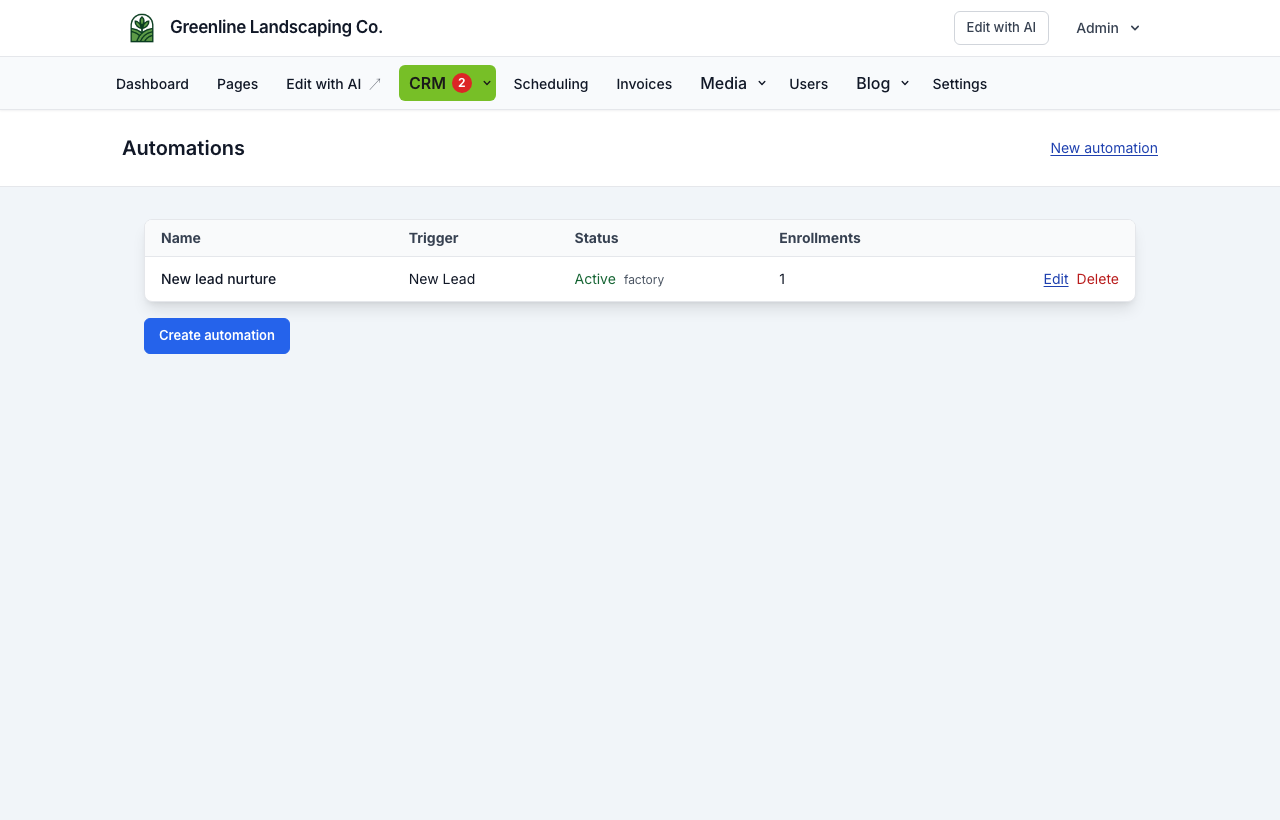
Create, duplicate, activate, or delete flows. Each row shows the trigger type and enrollment count.
Visual builder
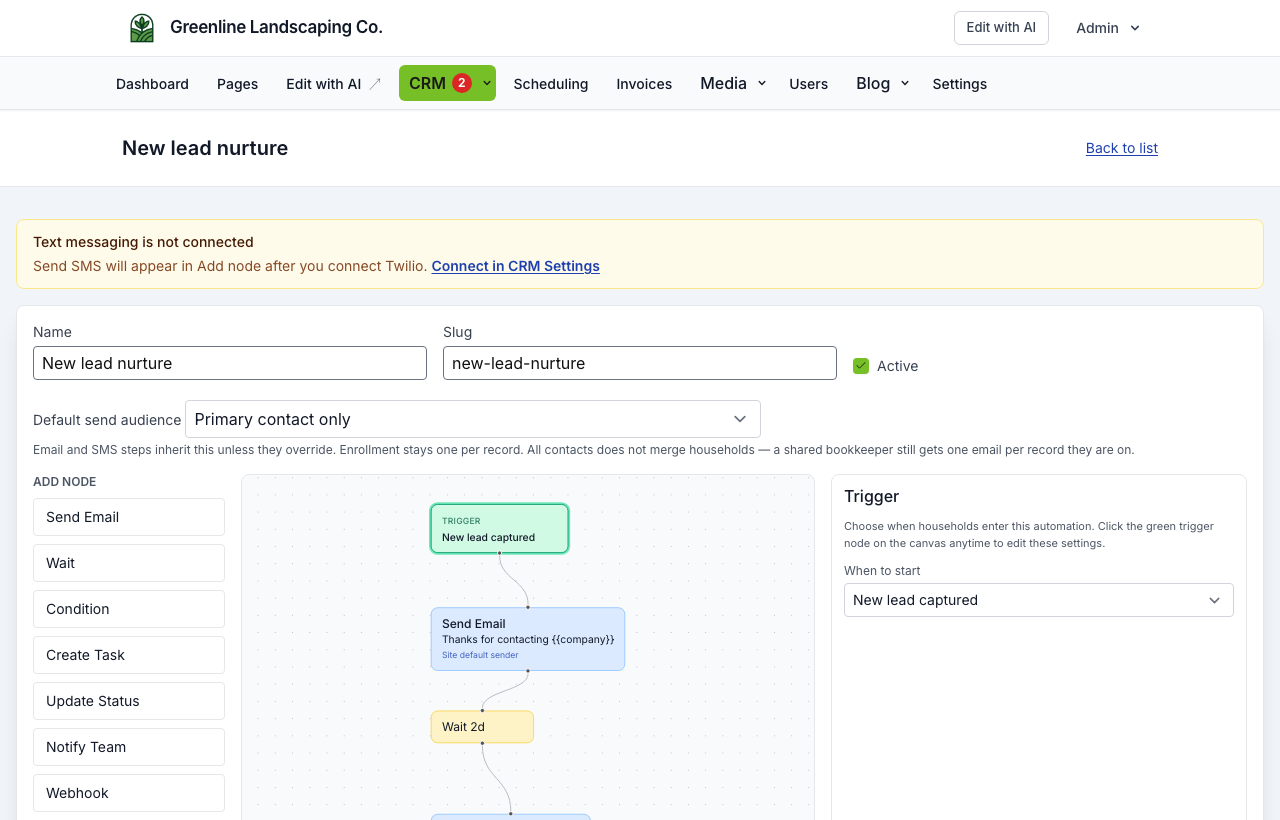
- Drag node types from the palette onto the canvas
- Connect nodes with edges; Condition nodes have Yes and No outputs
- Save the flow name, slug, trigger, and active status from the editor header
Factory-pushed defaults appear with source=factory until you override them locally.
Default send audience (header of the editor) is provisioned from the noun: Patient → Send-to, Student → All contacts, Household → Primary. Override per sequence or per email/SMS node. Do not default automations to all contacts.
The Add node list and trigger dropdown only include industry-specific steps that apply to this site. Open Dental and PMS appointment triggers appear for dental sites (or after Open Dental is connected)—not HVAC, salons, or generic clinics. POS guest match and POS order triggers appear for restaurant sites (or after Toast/Omnivore is connected).
Dental sites with Open Dental enabled can add paused Open Dental starters from this list (thank-you after a visit, review ask, staff recall task). Review copy, then turn them on.
Triggers
| Trigger | When it runs |
|---|---|
| New lead | A CRM record is created (e.g. contact form) |
| Form submitted | Specific form or source filter |
| Status changed | Record status updates |
| Score threshold | Score crosses a value |
| Invoice sent | A customer invoice is emailed (transactional; no marketing consent required) |
| Invoice paid | A customer invoice is paid via Stripe Checkout (transactional) |
| Document uploaded | A file is uploaded on a lead (optional tag filter; transactional) |
| Document signed / declined | A document package envelope completes or is declined |
| PMS appointment completed | A factory-attributed completed appointment outcome is returned for the lead |
| POS guest matched | A factory-attributed POS guest match is returned for the lead |
| POS order placed / paid / completed / cancelled | A factory-attributed order status change is returned for the lead |
| Manual | Staff enroll from lead detail only |
| Inbound webhook | External system POSTs to your site (see below) |
Inbound webhook trigger
Each webhook-triggered automation gets a unique URL on your public site domain (POST /crm/hooks/automations/{token}). Use it to create or match leads and enroll them in the flow. Your site must be reachable from the internet — local-only URLs will not work.
Node types
| Node | What it does |
|---|---|
| Send email | Email with subject/body; supports merge variables |
| Wait | Delay for N days/hours, or wait until an event (email opened/clicked/replied, document signed) |
| Condition | Branch on lead fields, custom data, email engagement, envelope.status, or form.* answers |
| Create task | Staff to-do on the lead (shows in CRM → Tasks) |
| Update status | Change lead pipeline status |
| Notify team | Email + in-app alert to staff |
| Webhook | Outbound HTTPS POST with lead payload (SSRF-protected) |
| SMS | Text message via Twilio when SMS is connected in CRM Settings |
| Create invoice | Create (and optionally send) a customer invoice with a pay link — requires Stripe Connect |
| Attach document | Copy a media-library file onto the lead (does not re-fire Document uploaded) |
| Fill document | Merge CRM fields into a document package and attach the PDF (internal; no email) |
| Request signature | Email or text a signing link to one person you choose: the booker, a parent, or the homeowner. It does not message everyone on the record. In HIPAA mode it needs the same communication consent as email |
| Open Dental patient match | Send the lead's email, phone, or both to the factory broker for a practice-authorized read lookup, then continue to the next node |
| POS guest match | Send the lead's email, phone, or both to the factory broker for a restaurant-authorized Toast/Omnivore guest lookup, then continue to the next node |
Open Dental node
The node performs a read-only patient-match request through NurtureSite; the client site never receives or stores Open Dental credentials. Choose email, phone, or email then phone as the matching input. The current node records operational success/failure in server logs and always advances to its next edge—it is not a Yes/No branch and does not write a patient record.
The Open Dental lookup is treated as an internal operation in HIPAA mode and remains available. A broker configuration or network failure is logged and does not stop later nodes. Use the separate PMS appointment completed trigger when a flow must react to a completed attributed outcome.
POS guest match node
The node performs a guest-match request through NurtureSite for Toast or Omnivore; the client site never receives or stores POS credentials. Choose email, phone, or email then phone. The node always advances to its next edge. Use POS order triggers for lifecycle follow-up after factory attribution.
Email node
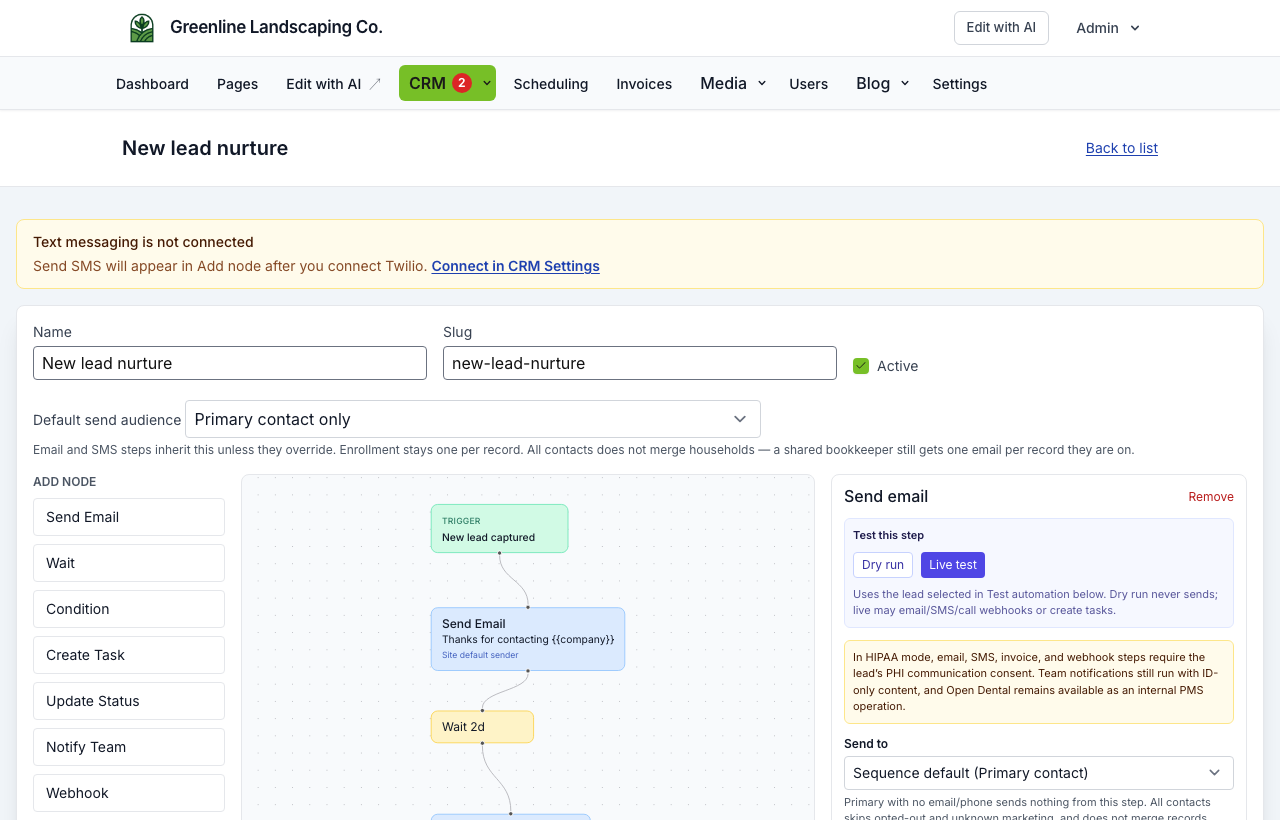
Choose a message template from this site’s library, or write a custom subject/body. Open the email designer for drag-and-drop layout (same builder as CRM → Templates and record compose). Use Insert field for merge tags. Designer images upload to Media with public URLs for inbox delivery. Open/click tracking is added automatically for condition branches later in the flow.
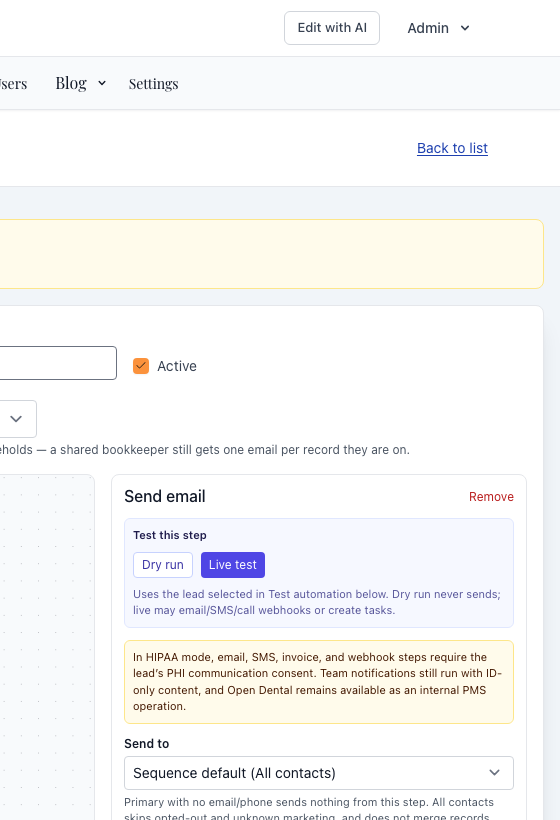
Send to (per email/SMS node):
| Send to | Who gets the message |
|---|---|
| Sequence default | Uses the sequence’s Default send audience |
| Primary | Only the primary contact. Right default for most household marketing. A pediatric patient with no email sends nothing unless you pick another option. |
| Send-to | Primary if they have that channel, otherwise guardian/billing. Right default for Patient reminders. |
| All contacts | Fan-out; each person keeps their own consent. Strong for school “email both parents.” Skips opted-out and unknown marketing and empty channels. Does not merge households — a shared bookkeeper still gets one email per record they are on. |
Sender mode (per node): use the site default, a specific staff user (display name on the email), or a custom from address. The from address must use your verified outbound mail domain.
Condition node
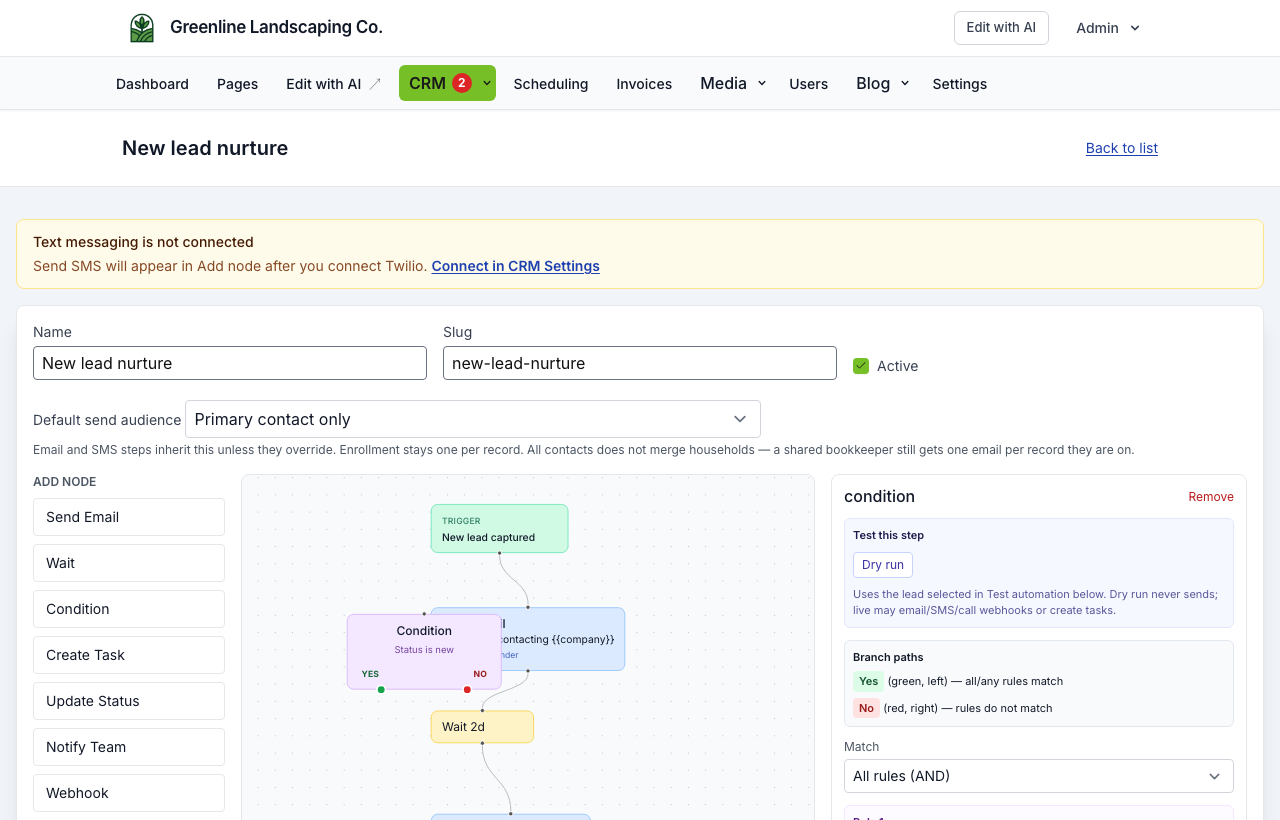
Build rules on lead fields, custom fields (additional_data), presence checks, and email engagement (opened, clicked, replied). Multiple rules can use all or any matching. Outgoing edges are labeled Yes and No on the canvas.
Reply detection uses tokenized Reply-To addresses on your Mailgun receiving domain when outbound email is configured with platform or Mailgun transport. Replies appear on the lead detail page in site admin.
Template variables
Available in email subject/body, SMS, notify messages, and reusable CRM → Templates:
Always available: {{name}} (record title — often the address on a household), {{first_name}} (primary contact greeting), {{email}}, {{phone}} (default send-to copied onto the record), {{company}}, {{source}}, {{status}}, {{score}}, {{message}}, {{page_url}}, {{notes}}, {{priority}}, {{estimated_value}}, {{assigned_user_name}}, {{deal_stage}}, form fields such as {{service}} / {{budget}}, and attribution such as {{utm_source}}. Condition first_name is the primary person; record name is the household/student title.
When connected on this site: invoice tokens ({{invoice_number}}, {{invoice_total}}, {{invoice_pay_url}}), booking tokens ({{appointment_service}}, {{appointment_starts_at}}), POS tokens ({{order_ref}}, {{order_total}}), and PMS refs ({{appointment_ref}}, {{pms_provider}} — no patient IDs).
Custom contact-form fields stored on the lead are also available as {{field_key}}. The editor only shows Invoice / Booking / POS / PMS chips when those features are connected.
Message templates
Each site has its own email and SMS library under CRM → Templates. Email editing uses a visual block designer that stores a design plus exported HTML. Pick a template on a Send Email / Send SMS node (live-linked by default — editing the template updates linked steps; Customize this message detaches that node). You can also Save as template from a node. Lead detail Conversation uses the same library for manual email/SMS.
Testing
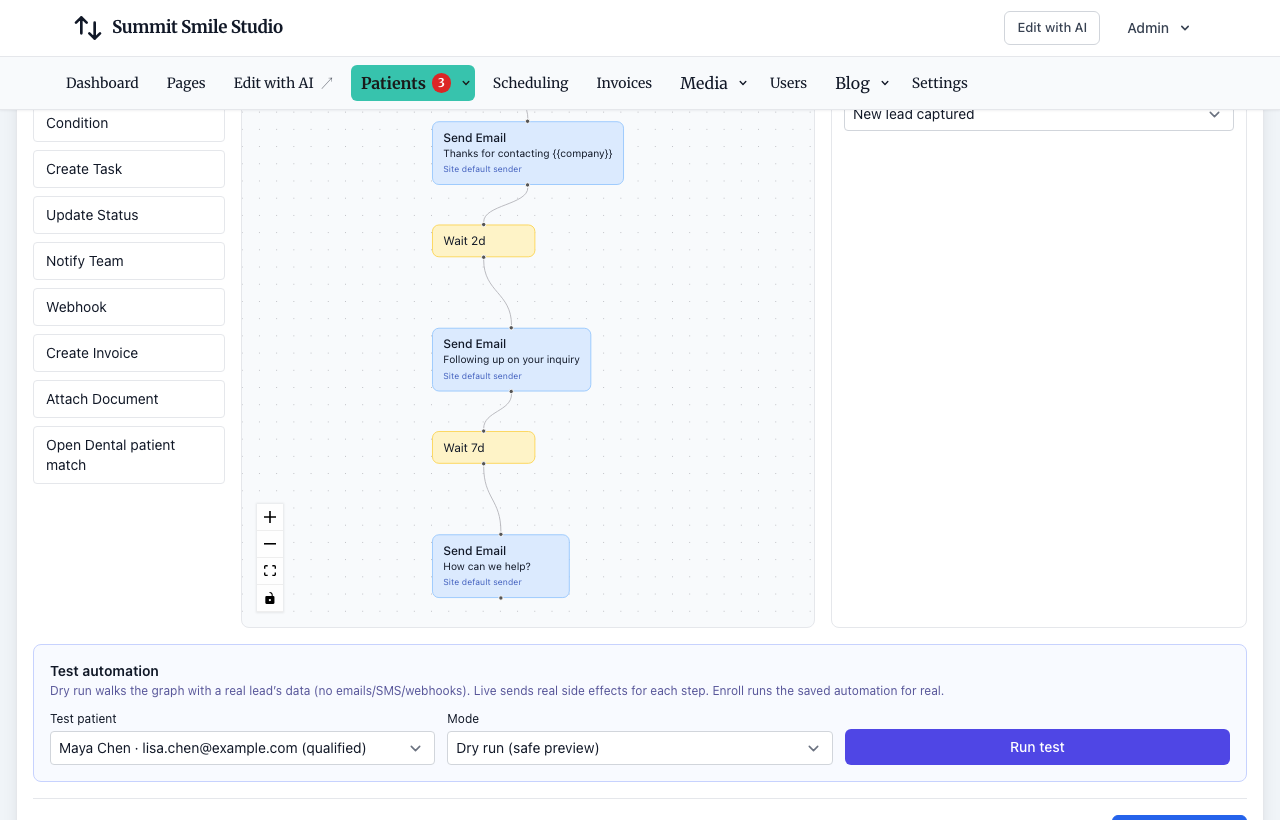
- Dry run — Walk the graph with a real record’s data; no emails, SMS, or webhooks sent
- Live test — Execute side effects for preview/debug
- Enroll — Run the saved automation for a chosen record (save the flow first)
- Per-node test — Select a node and run dry or live from its panel
For an Open Dental node, dry-run validates graph traversal without contacting the factory broker. A live per-node test can call the configured broker and should be used only with an authorized test record and a sandbox/test connection.
Pick a sample record from the Test panel before running (the picker uses your noun: “Select a patient”).
Enrolling and stopping
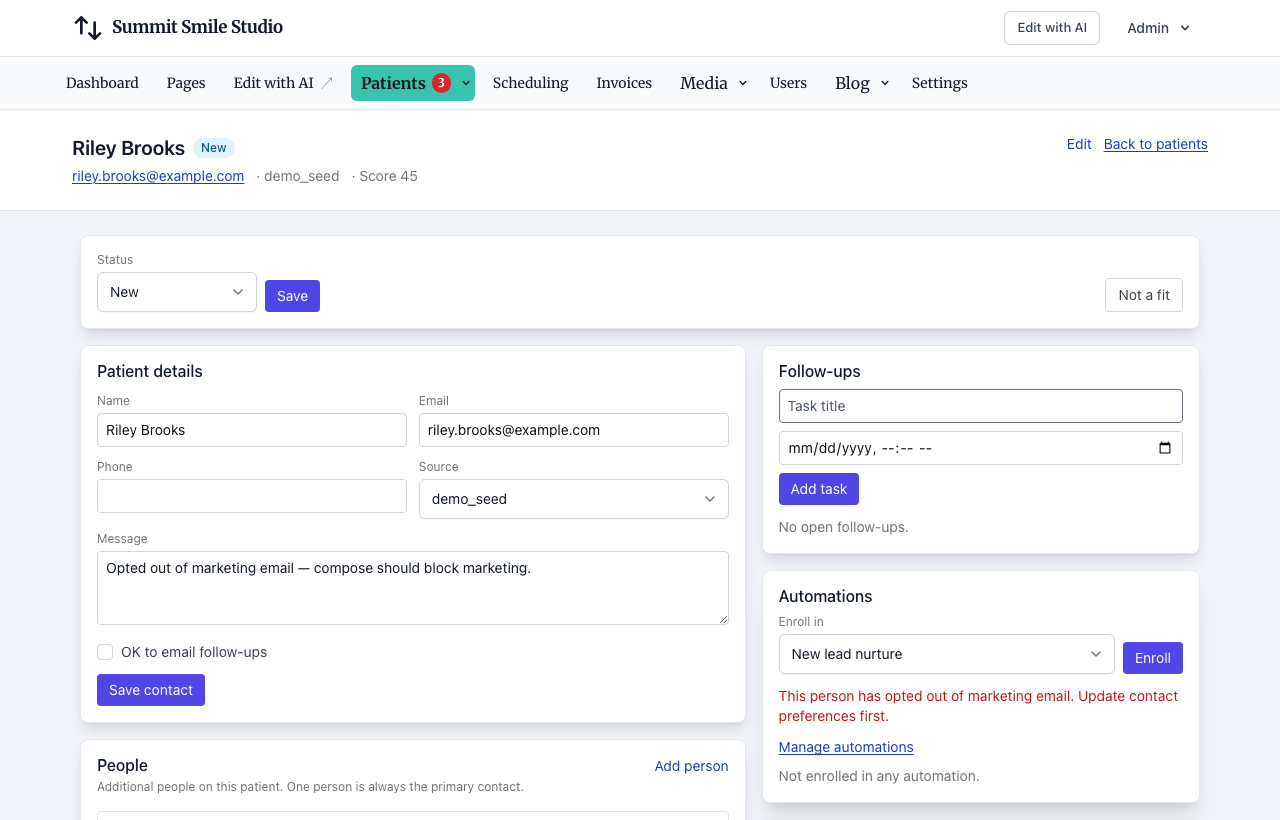
On CRM → {noun} → {record}, use the Automations card to enroll in an active flow or Stop an active enrollment.
Manual enrollment does not bypass a marketing opt-out for that person and channel. Automatic triggers also require marketing consent. An unsubscribe link opts that person out of marketing email (and stops marketing enrollments), not invoices or appointment mail. See Visitor experience.
Inbound vs outbound webhooks
| Inbound (trigger) | Outbound (node) | |
|---|---|---|
| Direction | External → your site | Your site → external URL |
| Purpose | Start a flow / create lead | Integrate Zapier-style tools, Slack, etc. |
| Security | Secret token in URL | HTTPS only; private IPs blocked unless allowlisted |
| HIPAA mode | May be restricted | Webhook requires recorded PHI communication consent; Open Dental remains an internal operation |
Troubleshooting automations
If emails do not send, open CRM → Settings and check Automation health:
QUEUE_CONNECTIONmust beredis(notsync) on the live site- Redis must be reachable
- The queue worker must listen on
defaultandcrmqueues - The scheduler must run every 5 minutes
- Outbound email must be configured (platform Mailgun uses
mg.nurturesite.com; BYO Mailgun needs DNS you add)
See CRM outbound email for the full checklist.
Caveats
- SMS requires Twilio connected in CRM Settings; until then Send SMS is hidden from the automation builder and SMS templates stay locked. Existing SMS steps are skipped (logged) and the flow continues
- Demo sites do not process live automations
- HIPAA mode allows internal status/task/condition/wait/Open Dental/fill document nodes; email, SMS, invoice, webhook, and request signature require recorded PHI communication consent and otherwise continue without the side effect; team notifications still run with PHI stripped. Do not email filled health-history PDFs. Who signs is separate from who receives a marketing email: “all contacts” on a preschool record includes the student, so a signature request goes to the parent instead. See Forms, waivers, and e-sign
- Marketing consent required for auto-enroll on new records (per person and channel)
- Recipients can opt out via unsubscribe links in sequence emails (marketing email only)
Related articles
- Site CRMNamed records (Customers, Patients, Households, Students, Leads), pipeline, tasks, alerts, invoices, and follow-up automations in site admin.
- CRM recordsName the list Customers, Patients, Households, Students, or Leads; primary contact, matching, consent, and send audience.
- CRM outbound emailPlatform or BYO Mailgun, DNS verification, and automation senders.
- CRM outbound SMSConnect your Twilio account to text leads from Conversations and automations.
- Open Dental integrationRead-only patient matching, appointment outcomes, data handling, and current rollout status.
- Visitor experienceForms, consent, optional AI chat agent, booking flow, unsubscribe, and website logins.
- Limitations and roadmapFeatures not yet available and known gaps. See /changelog for the public product roadmap.
- Forms, waivers, and e-signPrepare waivers and intake, collect signatures on your site, and keep signed PDFs on the CRM record—required at booking, sent after, or sent from the record any time.